Voice Note to Rap Video: Lip-Sync Your Own Recording
Voice note to rap video works like this: record yourself with your phone’s recorder, upload the file as Your song on the own song page, slide the orange frame over the best bit and create. The left face lip-syncs your words at the single mic and the right face backs you up. It runs on Wan 3.0, uses up to 15 seconds of audio and costs exactly what the Hotel Lobby track costs: 6 credits for 12 seconds at 480p.
There is no record button on the site, so the memo always starts in another app. The upload steps below follow Safari on iOS 26.5. No finished voice-note take is published here yet, so the section on the result describes what the studio is set up to do rather than a measured outcome.
Last revised
VOICE NOTE · HOTEL LOBBY AI
Your voice note, their faces
- Record
- Upload
- Lip-sync
Before you record: write a script that fits
- Budget your words. 12 seconds fits about 25 to 35 spoken words, so jot it down before you press record.
- Start talking the instant you hit record. Silence at the top is not trimmed, and silence means a shut mouth on screen.
- Pick a quiet room. Hum, traffic and chatter stay in the file.
- Go a touch slower and clearer than you would in a normal message.
- Want a beat underneath? Play it from a second speaker while you record, or mix it in an editor beforehand. The studio takes one file.
- Too long is fine. Record more than 15 seconds and choose the strongest stretch later.
Script starters to read aloud
- Retirement: “Thirty-one years, a thousand meetings, one legendary mug. Linda, the office will not survive without you. Enjoy the beach, boss!”
- Graduation: “Cap on, tassel flipped, loans pending. Jordan made it! Class of the year, and the loudest family in the stands.”
- Roommate reminder: “Rent is due Friday, the dishes are yours, and yes, that is my yogurt. Love you, roomie, now pay up.”
Your words, two faces
Drop your voice note here
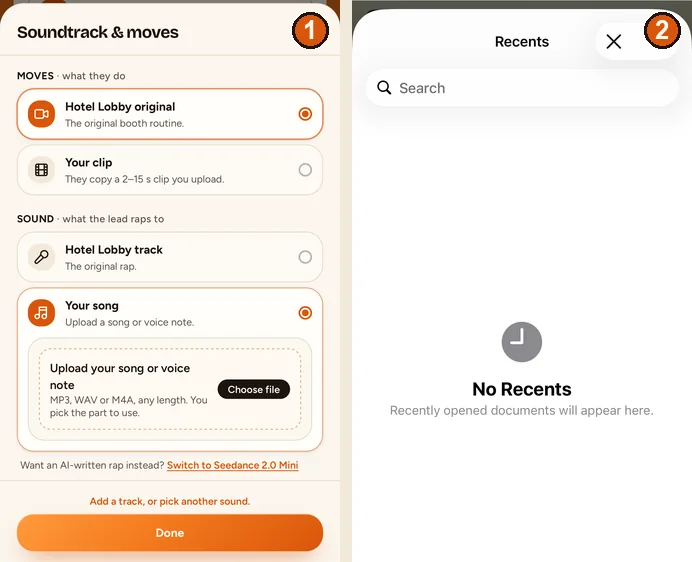
Your song is preselected: pick the two portraits, choose the file and slide the orange frame over the seconds you want.
Your two faces
A single face per picture. Left leads, right backs up.
Set
Take and sound
Price: 6 credits. Done in roughly 5 to 15 min; if it fails, the credits come back. See prices
From recorder app to the studio
iPhone
- In Voice Memos, select the recording, tap More, then Share, then Save to Files (Apple Support). It lands as an M4A.
- In the studio, tap Change on the sound row, pick Your song, then Choose file.
- Safari shows the Files picker with Recents, Shared and Browse; Voice Memos is not listed there. Browse to the file you just saved and tap it.
Android or a computer
Use the Share or Save option in your recorder app to store the memo as a file, then select it with Choose file. On a laptop any MP3, WAV or M4A will do. An Android recorder has not been tried yet.
Frame the best seconds and roll the take
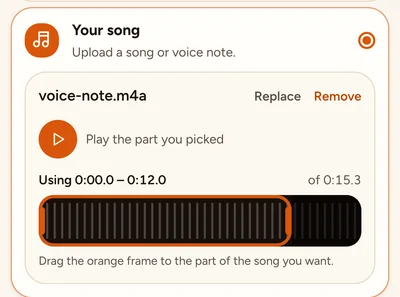
- Slide the orange frame along the waveform. A readout above it tells you where you are, for example “Using 0:00.0 – 0:12.0 of 0:15.3”.
- Tap Play the part you picked and listen once.
- If the memo is shorter than the take, the page tells you how many silent seconds will sit at the end. Choose a shorter length to get rid of them.
- Put whoever should speak the words in the left slot.
- Tap Create video. Price is identical to a take with the Hotel Lobby track.
What the studio does with your file
- It accepts what you pick. MP3, WAV and M4A are listed; AAC and OGG open as well, and the file can be any length.
- The orange frame is exactly as long as the take: 5, 8, 10, 12 or 15 seconds on the Hotel Lobby set.
- Your browser cuts out the framed part and uploads only that. If it needs cutting or converting, it travels as a WAV.
- Wan 3.0 animates the left face to your audio and keeps your recording as the soundtrack. The model is instructed not to alter it, so your voice is neither cloned nor changed.
Limits to know before you pay
- One voice, one face. Only the left face lip-syncs; two people cannot share a single recording in one take. Splitting it is covered in two people, one song.
- Mouth movement follows the voice. Crisp words help; mumbles and loud music under the vocal make it harder.
- Movement comes from the built-in Hotel Lobby routine unless you also upload Your clip.
- Every attempt is billed. Failed renders are refunded automatically.
- A finished voice-note take has not been published yet, so how closely the audio comes back has not been measured.
Add your own moves too
Upload Your clip for the movement and the memo as Your song: the clip drives how both people move, the recording drives what the lead says. Filming tips are in custom dance moves.
FAQ
Can I hit record right on the website?
No. Record in your phone’s recorder app, save it as a file, then upload it under Your song.
My iPhone memo is an M4A. Will it upload?
Yes. M4A, MP3 and WAV are listed, and AAC and OGG open too. The browser converts anything it needs to before uploading.
I recorded two minutes. Which part ends up in the video?
The part you frame. The file can be as long as you like; the take uses 2 to 15 seconds of it, matching the length you choose.
Will the AI make my voice sound like a rapper?
No. Your recording plays back as it is, and the model is told not to change it. Only the face on screen moves to it.
Can my partner and I each say half of the memo?
Not in one take: only the left face lip-syncs. Make two takes with the portraits swapped and join them in an editor.
Does uploading my own audio cost extra?
No. Sound never changes the price: 6 credits for 12 seconds at 480p.
There is a long pause at the start of my memo. What happens?
Silence is not trimmed, so the lead keeps a closed mouth during it. Slide the orange frame past the pause before you create.
References
Up next
Duet Lip Sync With Your Own Song: Can Both of You Sing?
Duet lip sync with your own song: why one take has one singer, how two takes and the mic-swap button give each of you a part, and when the AI rap is the better pick
Birthday Rap Video From Photos: A Step-by-Step Recipe
Birthday rap video from photos: AI verse or your own voice, a three-part topic formula, the setup, a listening pass and how to deliver it on the day
Custom Dance Moves for Hotel Lobby AI: Use Your Own Clip
Custom dance moves from your own clip: who controls what, how to film a clip the model can follow, sound choices, credits by length and honest limits
Hotel Lobby Video is an independent app with no ties to Quavo, Takeoff, Migos, Quality Control Music, Motown or COLORS.