Hotel Lobby AI on Your Phone: Browser Steps, No App
Hotel Lobby AI on your phone needs no download: open Hotel Lobby Video in Safari or Chrome, drop in a portrait of each person from your gallery, and tap Create video. A 12-second take on Wan 3.0 at 480p costs 6 credits and typically lands in about 5 to 15 minutes. iPhone parks the finished MP4 in the Files app, so one extra tap (Share, then Save Video) puts it in Photos.
Think of it as a short recording session run from your thumb: cast the pair, set the take, roll it, then carry the file to wherever you post. The iPhone steps follow Safari on iOS 26.5. The Android steps follow Google’s own help pages and have not been run on an Android device yet.
Last revised
HOTEL LOBBY AI · ON YOUR PHONE
Make it on your phone, no app
- Two photos
- Create
- Save to Photos
Before you open the studio
- Any phone browser will do. Safari and Chrome are the usual picks; there is nothing to install and no extension.
- Two portraits, one face in each. Camera-roll originals beat screenshots. HEIC from an iPhone is fine, as are JPG, PNG and WebP, as long as each side is 300 pixels or more.
- A Google account. The studio asks you to sign in at your first Create video tap.
- Credits, charged at the moment you create. The default take is 6 credits; the smallest pack is 10 credits for $9.99.
- A quarter of an hour, give or take. Most of it is waiting, and the phone can be locked or used for other apps meanwhile.
The studio fits in your pocket
Cut your duet from this screen
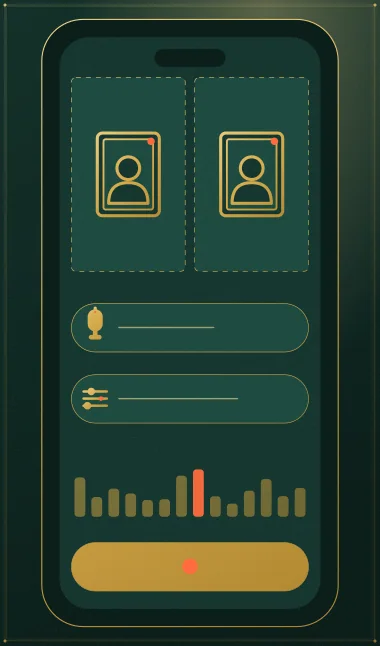
Already set to 9:16 for TikTok and Reels. Pick a portrait for each slot; the credits show on the button before anything is charged.
Your two faces
A single face per picture. Left leads, right backs up.
Set
Take and sound
Price: 6 credits. Done in roughly 5 to 15 min; if it fails, the credits come back. See prices
Hotel Lobby AI on your phone in three stages
Stage 1: cast the pair
- Go to hotel-lobby-video.app and scroll down to the studio. Rap video should already be selected.
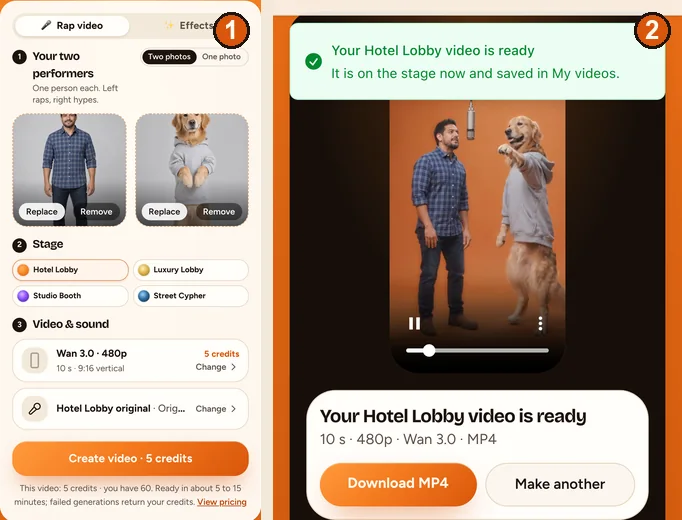
- Tap Add photo in the left slot. iPhone offers Photo Library, Take Photo or Choose File. Whoever sits here takes the verse at the single mic.
- Fill the right slot with the sidekick, who backs up the verse with ad-libs and moves. Got only one picture of the two of you? Flip the switch to One photo.
Stage 2: set the take
- Leave the stage on Hotel Lobby, the orange set. In Video & sound, tap Change beside Wan 3.0 for length and shape; 9:16 Vertical suits TikTok, Reels and Shorts. Each choice lists its credits.
- Tap Change on the sound row to choose the audio: the Hotel Lobby track, Your song (a file from your phone) or, on a Seedance model, an AI rap written for you.
Stage 3: roll and wait
- Tap Create video. On the first go, Safari hops to Google to sign you in and back again; the two portraits stay put. Buy credits if asked, and the take starts by itself when you return.
- A timer runs on screen until the take is done. Closing the tab is safe: rendering continues on the server and the result waits in My videos.
Getting the MP4 into your camera roll
iPhone (Safari)
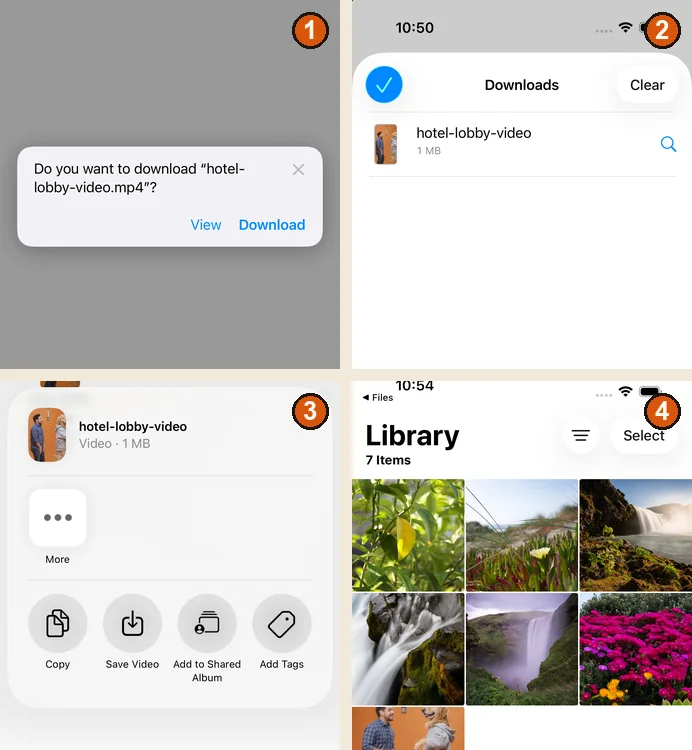
- Under the finished take, tap Download MP4, then confirm Download when Safari asks about “hotel-lobby-video.mp4”.
- A small arrow replaces the icon at the left of the address bar. Tap it and open Downloads to see the file.
- In the Files app go to Browse, then Downloads. It sits under iCloud Drive if that is switched on, otherwise under On My iPhone.
- Long-press hotel-lobby-video, choose Share, then Save Video. It now shows up in Photos, ready for Messages, WhatsApp, Reels or TikTok.
Menu names can shift a little between iOS versions. Apple’s own walkthrough is Where to find downloads on your iPhone.
Android (Chrome)
- Tap Download MP4. Chrome drops the file into your downloads.
- Open your phone’s Files app to find it, or check the Downloads list inside Chrome (Chrome Help).
- Google Photos shows it under Collections, On this device, in the Download folder (Google Photos Help).
These Android steps are taken from Google’s help pages (read October 5, 2026) and have not been checked on a handset yet.
Which shape for which app
| Posting to | Shape | Worth knowing |
|---|---|---|
| TikTok | 9:16 | Switch on the AI-generated label. TikTok bans AI content of anyone under 18, and of private adults who have not agreed to it (TikTok). |
| Instagram Reels | 9:16 | Instagram asks for 720 pixels or more at 30 frames per second (Instagram Help). A sample Wan 3.0 720p file from the studio measured 720 × 1280 at 30 fps; the 480p default is 480 pixels across. |
| YouTube Shorts | 9:16 or 1:1 | Vertical or square clips of three minutes or less are treated as Shorts (YouTube Help). |
| Group chats | Any | Share the MP4 straight from Photos or your gallery. |
On Wan 3.0, 5, 8, 10, 12 or 15 second takes run 3, 4, 5, 6 or 7 credits at 480p and 4, 6, 8, 10 or 12 at 720p. The trade-offs are laid out in 480p, 720p or 1080p.
When something on the phone goes sideways
- “That photo is too small”: you probably picked a chat screenshot. Go back to the camera-roll original, 300 pixels or more per side.
- “That photo is too narrow or too wide”: crop in around the person. Panoramas and wide group shots get rejected.
- Google sign-in never appeared: tap Create video once more. Safari makes the round trip and your portraits are still there.
- You wandered off mid-render: open My videos from the menu. The take kept going without you.
- The video is missing from Photos: iPhone saves to Files first. Use Share, then Save Video.
- Your voice memo is not in the picker: export it from Voice Memos to Files before you choose it. Walkthrough in voice note to rap video.
- “You have 3 videos rendering”: three takes can run side by side. Start another when one finishes.
FAQ
I only have my phone, no laptop. Can I make the whole Hotel Lobby duet on it?
Yes. Hotel Lobby Video works in Safari, Chrome or any other mobile browser, from adding the portraits to downloading the MP4. Nothing gets installed.
My phone locked while the take was rendering. Did I lose it?
No. Rendering happens on the server, so the finished take is waiting in My videos when you unlock and come back.
I downloaded the video on my iPhone but it is not in Photos. Where did it go?
Into Downloads in the Files app. Long-press it, tap Share, then Save Video, and it appears in Photos.
My iPhone photos are HEIC. Do I have to convert them first?
No. The browser turns each one into a JPG before upload and strips the location data on the way.
Is there a free version on mobile?
No. Each take is paid with credits when you create it, 6 for 12 seconds at 480p. If a render fails, the credits come back automatically.
Will the MP4 I save have a logo stamped on it?
No. Paid takes download as a clean MP4 with no watermark.
References
Up next
Which Hotel Lobby AI App? Pick by Sound, Photos and Price
A Hotel Lobby AI app finder: start from the sound you want, then the photos and phone you have, then the price each app states on its own page
How to Do the Hotel Lobby Trend: 3 Routes Compared (2026)
How to do the Hotel Lobby trend with two portraits, an AI video prompt or an editor template, including costs, free options and posting steps
Voice Note to Rap Video: Lip-Sync Your Own Recording
Voice note to rap video: write a script that fits, move the memo off your phone, frame the best seconds and know what the lip-sync can and cannot do
Hotel Lobby Video is an independent app with no ties to Quavo, Takeoff, Migos, Quality Control Music, Motown or COLORS.