Dog Rap Video: How to Make Your Dog Rap With AI
To make a dog rap video, open the pet rap video page, add your dog’s photo and a photo of its partner (you or another pet), keep the Hotel Lobby stage and press create. Wan 3.0 films the pair on the orange set, your dog up on its hind legs at the single mic, to the Hotel Lobby track. 12 seconds at 480p costs 6 credits and usually arrives in about 5 to 15 minutes.
Read on for the photo to pick, the steps, what the studio does to your dog’s picture, the sound options and how to fix an odd take. Our own test paired a dog with a person; cats follow the same steps, but we have not tried one yet.
Last revised
DOG RAP VIDEO · HOW TO
3
Your dog, on the mic
- Photo
- Stands up
- At the mic
Pick the right photos first
- Your dog: one animal per photo, looking at the camera, whole body in frame if you can get it.
- Its partner: you, a friend or another pet, again one per photo.
- Any phone or computer browser. Nothing to download.
- Credits: 6 for 12 seconds at 480p. The smallest pack is 10 credits for $9.99.
Your dog’s session
Cut your dog’s rap take here
Ready for a pet and a partner: the left photo raps, the right photo backs it up. The button shows the credits before you create.
Your pet and its partner
A single pet or person per picture. Left leads, right backs up.
Set
Take and sound
Price: 6 credits. Done in roughly 5 to 15 min; if it fails, the credits come back. See prices
Make the dog rap video in seven steps
- Go to the pet rap video page. Its studio is already set for a pet and a partner.
- Put your dog’s photo on the left to make it the lead voice, or on the right to make it the backup.
- Fill the other slot with the partner’s photo.
- Keep the Hotel Lobby stage and Wan 3.0. Choose a length (5, 8, 10, 12 or 15 seconds) and a format: 16:9 is the default, 9:16 suits TikTok and Reels.
- Under Video & sound, pick the Hotel Lobby track, Your song, or an AI rap on a Seedance model.
- Press create. You sign in with Google once; the button shows the credits before anything is charged.
- When it is done, download the MP4. A copy stays in My videos.
Why your dog stands up at the mic
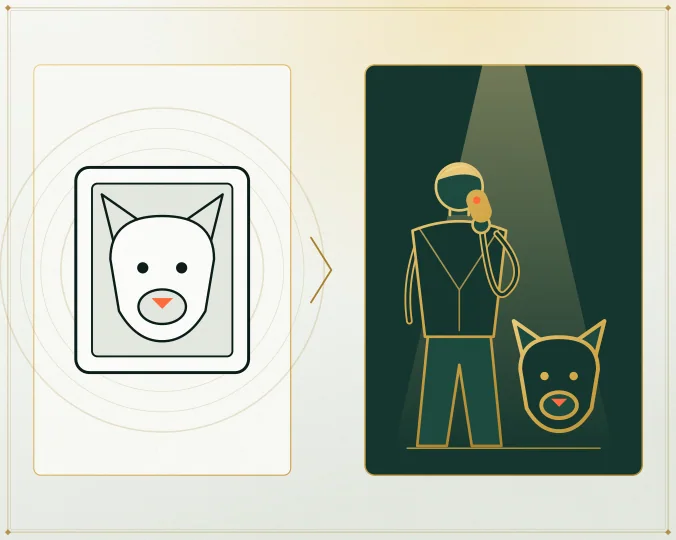
Before the take, the studio redraws each photo as a full-length portrait of the same animal or person, upright, on a plain background. That step is what puts your dog on its hind legs. The video model then copies the Hotel Lobby routine with the two portraits. You only ever see your own photo; the portrait is used for the render and deleted along with your photos after 7 days.
The images below come from one of our paid tests: the AI-made corgi picture we uploaded and a frame from the finished take.
Our own test take
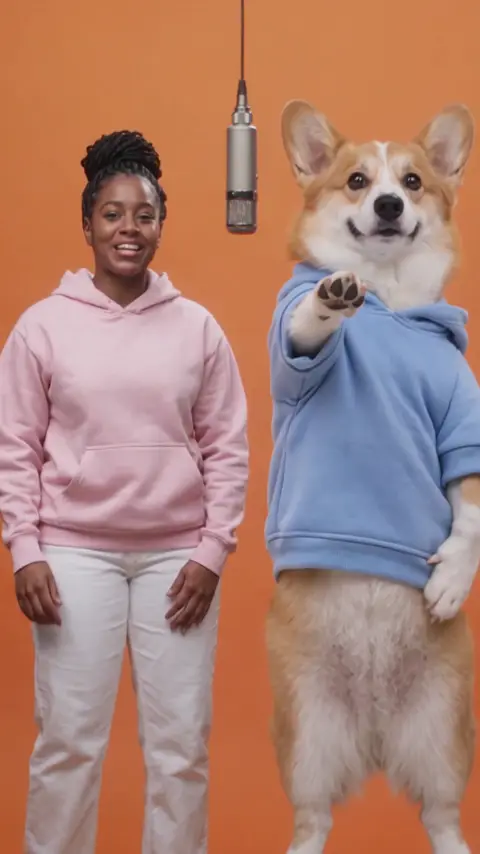
Wan 3.0 · 480p · 10 s · 9:16
- Pipeline test render, made outside the public website.
- Sound: the Hotel Lobby song.
- Compressed 480 × 854 copy for the web. The settings listed refer to the full-size take.
Wan 3.0, 480p, 10 seconds, Hotel Lobby track: a woman and a corgi, both AI-made pictures. The corgi stayed on two legs through the routine, turn included.
Which sound suits a dog
| Sound | What plays | Model | Tried with a pet? |
|---|---|---|---|
| The Hotel Lobby track | The trend’s verse, with the lead moving its mouth to it | Wan 3.0 | Yes, a dog |
| Your song or a recording | The stretch of your audio you select; the lead lip-syncs it | Wan 3.0 | Not yet |
| AI rap | A new rap about your topic, like “Pepper owns the sofa and the remote” | Seedance | Not yet |
You can upload a bark or a howl as Your song (MP3, WAV or M4A) and slide the orange frame over 2 to 15 seconds of it. We have not tried an animal recording ourselves.
When the dog rap video looks odd
| What you notice | What to do |
|---|---|
| It does not look like your dog | Use a sharp, face-on daylight photo. Side views and dim photos lose the face. |
| An extra animal or a person appears | Crop the photo down to one animal. |
| Your dog is as tall as the human | Leave it: sizes are not kept to scale, and that is part of the charm. |
| The paws look like hands when pointing | The routine includes hand gestures and the model copies them. Run another take or keep it for laughs. |
| The dog hardly moves its mouth | Move the dog to the left, where the lead voice sits, and pick a stretch with a clear vocal. |
A failed take is refunded automatically. A finished take you dislike is not, and every new try is billed separately.
FAQ
Is there a free way to make a dog rap video?
No. Each take is paid in credits when you create it: 6 for 12 seconds at 480p. The smallest pack is 10 credits for $9.99, and failed takes are refunded.
Will my cat stand up and rap too?
A cat goes through the same steps, and the portrait step asks it to stand as well. We have not tested a cat yet, so treat the first take as an experiment.
Can I be in the video with my dog?
Yes. Use your own photo in one slot and your dog’s in the other. Whoever is on the left raps; the right side is the backup.
My only good photo shows my dog lying down. Will it work?
It can, because the portrait step redraws your dog standing either way. We have not tested a lying-down photo, though, so a face-on shot with the whole body visible is the safer first try.
How long does a dog rap take to render?
Usually about 5 to 15 minutes on Wan 3.0. You can close the tab; it waits in My videos.
Up next
Viral Migos AI Videos: The Hotel Lobby Clips Worth Watching
The viral Migos AI videos of the Hotel Lobby trend, linked to the original posts on X and YouTube, with the pattern behind them and Quavo’s answer
How to Make an AI Rap Video From Photos (2026 Walkthrough)
A full session walkthrough for an AI rap video from photos: each setting, the credit prices, the three sounds and fixes for bad takes
Hotel Lobby Duo Ideas: 15 Pairs and What They Should Rap
Fifteen Hotel Lobby duo ideas sorted by friends, family, couples and teams, each with a sound (the trend track, your own song or an AI rap) and a ready topic line
Hotel Lobby Video is an independent app with no ties to Quavo, Takeoff, Migos, Quality Control Music, Motown or COLORS.