Captions for an AI Rap Video: Add Them, Then Fix Names
To add captions to an AI rap video, do it after download: the MP4 carries sound but no subtitles and comes with no lyric sheet. TikTok, Instagram and CapCut can all transcribe the audio for you. Then play it back line by line and correct names and bars by hand before posting.
The app steps below follow each company’s own help pages, read on October 5, 2026; they have not been run on Hotel Lobby Video files yet. CapCut’s help warns that background noise lowers accuracy, and a verse over a beat is harder to transcribe than speech, so plan on fixing a few lines.
Last revised

AI RAP VIDEO · CAPTIONS
Add captions, fix the names
- Download
- Auto-captions
- Fix by ear
Why your MP4 arrives without subtitles
- You download hotel-lobby-video.mp4: picture and sound, 5, 8, 10, 12 or 15 seconds long on the Hotel Lobby set, with no captions burned in.
- There is no lyric sheet and no separate audio track.
- Where the words come from depends on the sound: an AI rap is written by the model from your topic; Your song is your own recording; the Hotel Lobby track is the original verse.
- Your topic is not the lyrics. The AI writes its own lines around it, so captions have to be taken from what is heard.
Pick a caption tool
TikTok
Upload the take, then tap Captions on the preview screen, or on the post screen open More options and Select video language (TikTok Support). You can still correct captions after posting by tapping the caption and choosing Edit captions.
Instagram Reels
Before you share, open More options and switch on Enable closed captions (Instagram Help). The captions are generated from the speech, and a separate toggle can translate them.
CapCut
In the editor, go to Captions, then Auto Captions, choose the language and tap Generate (CapCut Help). The text is burned into the export, so it travels to every app you post on.
A proofreading pass for rap captions
- Turn the volume up and step through one line at a time.
- Fix names before anything else. Auto-captions love turning names into everyday words.
- Type what the verse really says, not what you meant it to say. Captions that disagree with the audio look broken.
- Break long lines so every caption fits on two short rows.
- Check slang and rhymes, then watch the whole take once more.
When the name is wrong in the audio itself, captions cannot rescue it. Make a new take, or record the words and upload them as Your song.
Layout: keep words off the faces
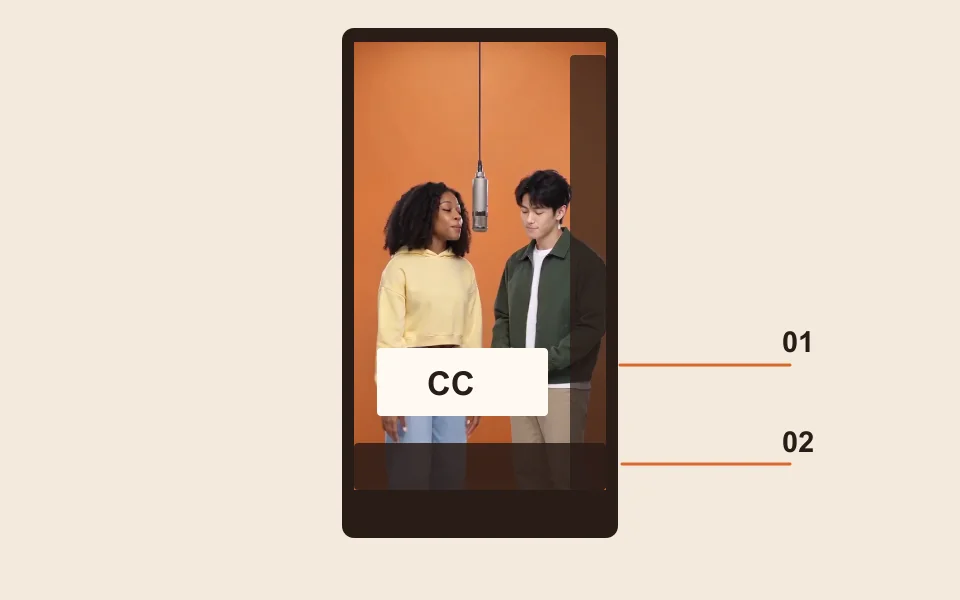
- On the orange set both faces sit in the upper half with the shared mic between them, so the lower third is the safe zone for text.
- TikTok and Reels place buttons down the right side and text along the bottom. Leave margin there and check the in-app preview.
- Use one caption style for the pair, or a color per face for a battle.
Final check before posting
- Play the export start to finish: timing, spelling, nothing over a face.
- Hang on to the caption-free MP4 as well. It stays in My videos until you delete it.
- On TikTok, also switch on the AI-generated label (TikTok).
FAQ
Can I get the lyrics as text from Hotel Lobby Video?
No. There is no lyric sheet and no separate audio. The words exist only in the MP4’s sound, so captions come from transcribing it.
Can I just paste my topic in as the captions?
No. The topic tells the AI what to rap about, and it writes its own lines. Captions need to match what is actually rapped.
TikTok, Instagram or CapCut: which handles rap lyrics best?
They have not been compared side by side. All three transcribe automatically and all three let you edit the text, so pick the app you post from.
I want the captions on every platform, not just TikTok. What should I use?
CapCut. Its auto captions are burned into the exported file, so they show wherever you upload it. TikTok and Instagram captions only live inside their own apps.
Do auto-captions cost anything?
The caption features on TikTok’s, Instagram’s and CapCut’s help pages list no fee; check the app itself before relying on paid extras.
The rap says my friend’s name wrong. Can captions fix it?
Only on screen. To change what is heard, make a new take, or record the words yourself and upload them as Your song.
References
Up next
How to Make an AI Rap Video From Photos (2026 Walkthrough)
A full session walkthrough for an AI rap video from photos: each setting, the credit prices, the three sounds and fixes for bad takes
Hotel Lobby CapCut Template: What You Will Actually Find
What a Hotel Lobby CapCut template can and cannot do, the templates on CapCut’s site, how to use one, where CapCut points for the AI version, and when two portraits fit better
AI Rap Video in Your Language: Spanish, French and More
AI rap video in your language: the topic’s language wins, starters in five languages, names that survive, a native-speaker check and exact-word recording
Hotel Lobby Video is an independent app with no ties to Quavo, Takeoff, Migos, Quality Control Music, Motown or COLORS.